
ML for Games Course documentation
Discord 101
Discord 101
Discord is a free chat platform. There is a Hugging Face Community Discord server with more than 90K members, you can join with a single click here
Starting in Discord can be a bit intimidating, so let me take you through it.
You’ll choose your interests when you sign up to our Discord server. Make sure to click “ML for Game Development”, and you’ll get access to the “Game Dev” category containing all the course-related channels. If you feel like joining even more channels, go for it! 🚀
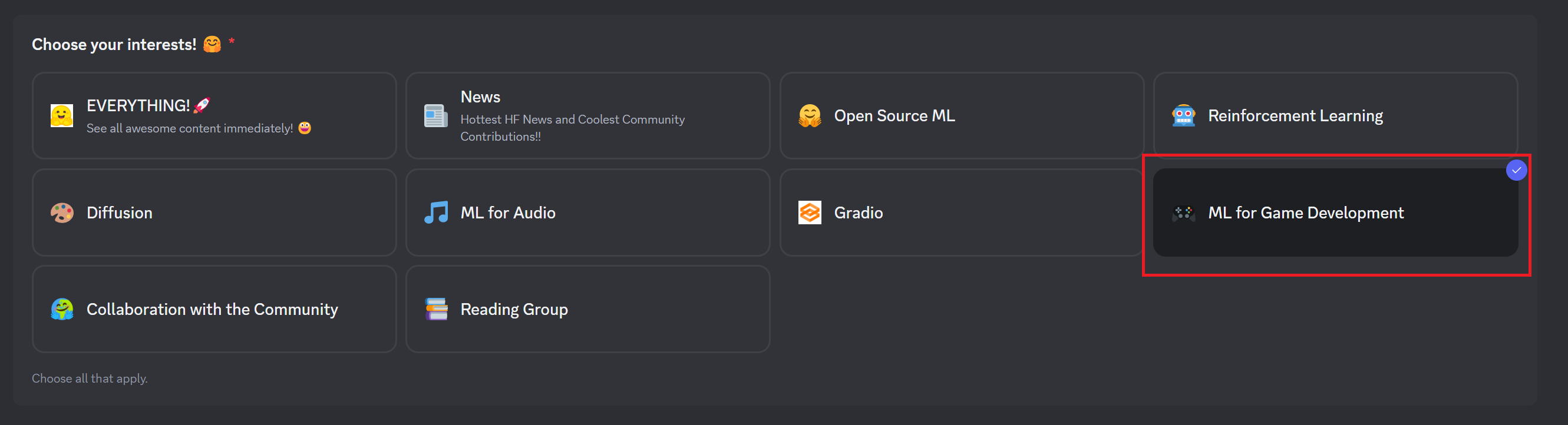
Then click next, and you’ll get to introduce yourself in the #introduce-yourself channel.
Here’s all the ML for Game Development channels:
ml-4-games-dev: where you can exchange about ML for games development.ml-4-games-i-made-this: where you can share your projects and models.
Here’s some advice:
- Don’t hesitate to participate often in the Discord channels, it’s how you’ll get the most of the course by meeting new people interested in AI in games, finding coworkers, and getting advice.
- There are voice channels you can use as well, although most people prefer text chat.
- You can use markdown style for text chats. So, if you’re writing code, you can use that style. Sadly, this does not work for links.
- Don’t hesitate to create threads when you write a message. It’s a good idea when it’s a long conversation.
- We want to keep this Discord server safe for everyone, so if you see some bad behavior, don’t hesitate to tag @admin.